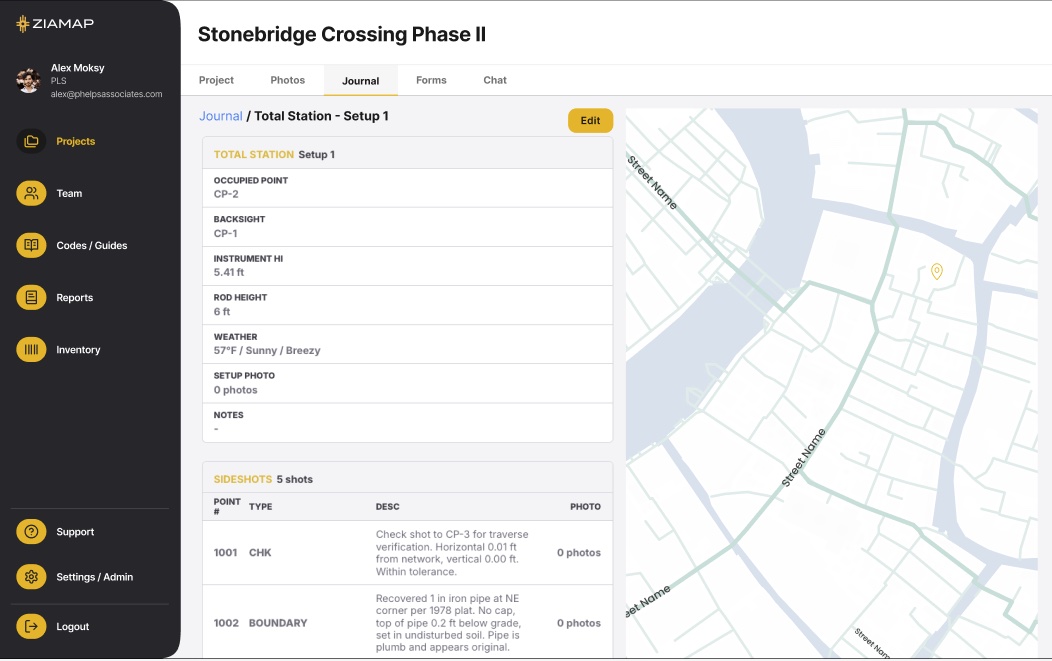
See the field from your desk, in real time.
The office side of ZiaMap field documentation. The office sees every photo, note, and signature the moment the crew captures it. Review, organize, and report without a status call.
GET BETA ACCESSBUILT TO SUPPORT THE FIELD NOT REPLACE IT
Office staff do not capture in the desktop app. They review, organize, and report on what the field already captured.
EVERYTHING IN ONE FIELD JOURNAL
Photos, notes, GPS coordinates, timestamps, and crew attribution all in one chronological view. Sort by project, by day, by crew.
DESIGNED FOR REVIEW, NOT DATA ENTRY
The desktop app is read-and-review. Office staff cannot accidentally modify field records. Every entry stays as captured.
BUILT FOR REAL-WORLD WORKFLOWS
Designed to mirror the actions you take every day with a field documentation system that respects how field crews actually work.
INTERACTIVE MAP VIEW
Every captured photo placed on the project map. Click any pin to view the photo, note, and metadata.
INSTANT PDF REPORTING
One-click export of the Field Journal as a stamp-ready PDF. No formatting required.
A CLEAN, COMPLETE RECORD
Every entry shows who, where, and when. Field records that are complete, accurate, and easy to retrieve.
How teams use the desktop app.
Four high-frequency workflows the desktop app makes faster.